
Time tracking that works the way you do
Mobile, web, and kiosk — one system for field crews, office staff, shop floors, and warehouse teams. Everyone clocks in the way that fits their day.
Compare plans →Three ways to clock in
Pick the form factor that fits each person on your team — or mix and match. Everything syncs in real time.
Mobile app — for field workers
Android and iOS
Clock in from anywhere with one tap. Technicians don't have time for complicated apps — one screen, done.
- One tap to start or stop
- Job selection in seconds
- Optional GPS at clock-in/out
- Notes per entry
- Push notifications
Web dashboard — for office staff
Any browser, any device
Office workers have desks. They shouldn't need a mobile app to track time. Log in from any browser and go.
- No app install needed
- Desktop, laptop, or tablet
- Quick entry with job and project assignment
- Real-time sync across devices
- Full admin console for owners and supervisors
Kiosk mode — for plant and warehouseTeam+
Shared tablet, PIN sign-in
Not everyone carries a phone on the job. One shared tablet covers your whole warehouse or plant floor.
- Tablet or wall-mounted display
- PIN sign-in
- Job and department selection
- Works offline and syncs when back online
- Multi-location support
Built for the person running the business
Delegate the routine, keep the oversight. Spend your time on the work, not the paperwork.
Supervisor approvalsTeam+
Delegate without losing control. Assign supervisor roles, route timecards through an approval workflow, and escalate exceptions to an admin. Every edit is logged with who changed what, when, and why.
Timesheet reminders
Stop chasing people for timesheets. Push notifications land on mobile, email reminders land in the inbox, and Monday morning stops being "where's your timesheet?" hour.
Job costingBusiness
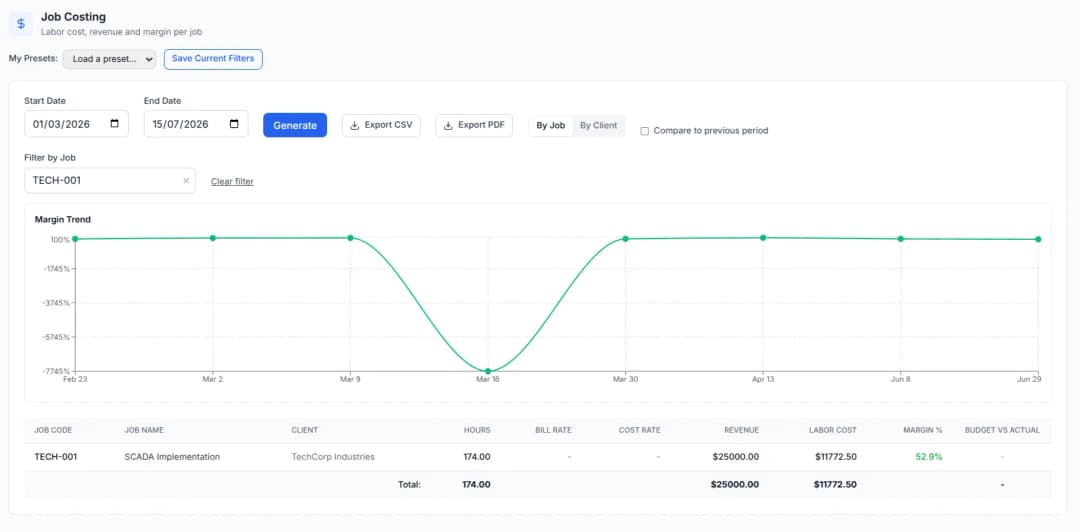
Know where your labor went. Track hours per job, attach bill and cost rates, set budgets, and see profitability by project. You can't price the next job right if you don't know what the last one cost.
Job dashboardBusiness
One screen for the whole story of a job. Every timecard, the team on site, approved vs. pending hours, budget burn, overtime, labor cost and margin — rolled up across sub-tasks so you can see exactly where a project stands at a glance.
Overtime tracking
Configurable daily and weekly overtime thresholds, automatic calculation on every timecard, and dedicated overtime reports so nothing sneaks up on payroll.
See profitability by job, not just hours worked
Bill rates, cost rates, and budgets roll up automatically into one report per job — so you can tell which projects are making money before the invoice goes out, not after.
- Actual vs. budgeted hours, live
- Labor cost and margin per job
- Export straight to CSV or branded PDF
Ask questions. Get answers. No training needed.
Business owners want answers, not reports. The BizyClock AI assistant reads your time data and answers plain-English questions — no SQL, no pivot tables, no “how do I pull that report?” It's the easy button for bosses who haven't memorized every screen in the app.
Reports your accountant will actually like
Every report you need for payroll, billing, and project review — all exportable.
Standard reports
- Timesheet
- Mileage
- Job hours
- Vacation balances
- Sick days
- OvertimeTeam+
- AttendanceTeam+
- Employee hoursTeam+
- PayrollTeam+
- Job costingBusiness
- UtilizationBusiness
- Workload heatmapBusiness
Export options
- Branded PDF
- CSV (Excel compatible)
- Saved report presetsTeam+
Scheduled reportsBusiness
Set it once and have Monday-morning timesheets land in your inbox automatically. Perfect for weekly job-hour summaries and payroll exports.
Plays nicely with your stack
Available today
- Email notifications and reminders
- CSV and PDF export
- QuickBooks Time (TSheets) CSV import
On the roadmap
- Direct QuickBooks sync

Ready to put BizyClock to work?
Set up your first clock-in in minutes — no credit card required to start.
Compare plansUp and running the same day
Self-serve setup, helpful docs, and real humans on email when you need us.
What's included
- Guided self-serve setup
- Help documentation
- Email support at support@bizyclock.com (all plans)
- Priority supportBusiness
- Dedicated supportEnterprise
30-day guarantee
Every plan comes with a 30-day, no-questions-asked refund on your first purchase. If BizyClock isn't the right fit, just email us within 30 days.